
Fixed-price implementation with clear steps
Every implementation follows the Memulai Opernix (Getting started) path: the same sequence as the chapters of the user guide, from first sign-in to first transaction.
Five milestones to go-live
The implementation fee is fixed up front, based on the agreed scope. Every milestone has a deliverable you can check.
Requirements & quote
We study your business processes, the number of companies and branches, and the modules you need. The result is a written quote with a fixed implementation fee, milestones and an agreed cut-off date.
What you prepare: List of processes, sample documents, estimated number of users
Company setup
Company profile and tax details, branches, currencies and fiscal year. Chart of accounts (the Indonesian template can be used), automatic account determination, posting groups, numbering and document types.
What you prepare: NPWP (tax ID), NITKU, address, logo, list of branches and warehouses, chart of accounts
Users, roles & approvals
User accounts, roles with a permission matrix per company, and Approval Matrix rules that match your authority limits.
What you prepare: List of users and their duties, approval limits
Data migration
Master data is imported from Excel templates: items, customers, suppliers, bank accounts. Then opening balances as of the cut-off date: stock per warehouse, open invoices and bills, fixed assets, trial balance.
What you prepare: Master data and balances from the current system in Excel
Go-live
We review the go-live checklist together: balances reconciled, users ready, numbering correct. The first transaction is posted in Opernix the day after cut-off.
What you prepare: Go-live sign-off from the process owners
Set the cut-off date first. The cut-off date is the last day of bookkeeping in the old system, for example 30 June. Transactions are posted in Opernix from the next day, and all opening balances use this date.
Move your data from Excel, with a preview before saving
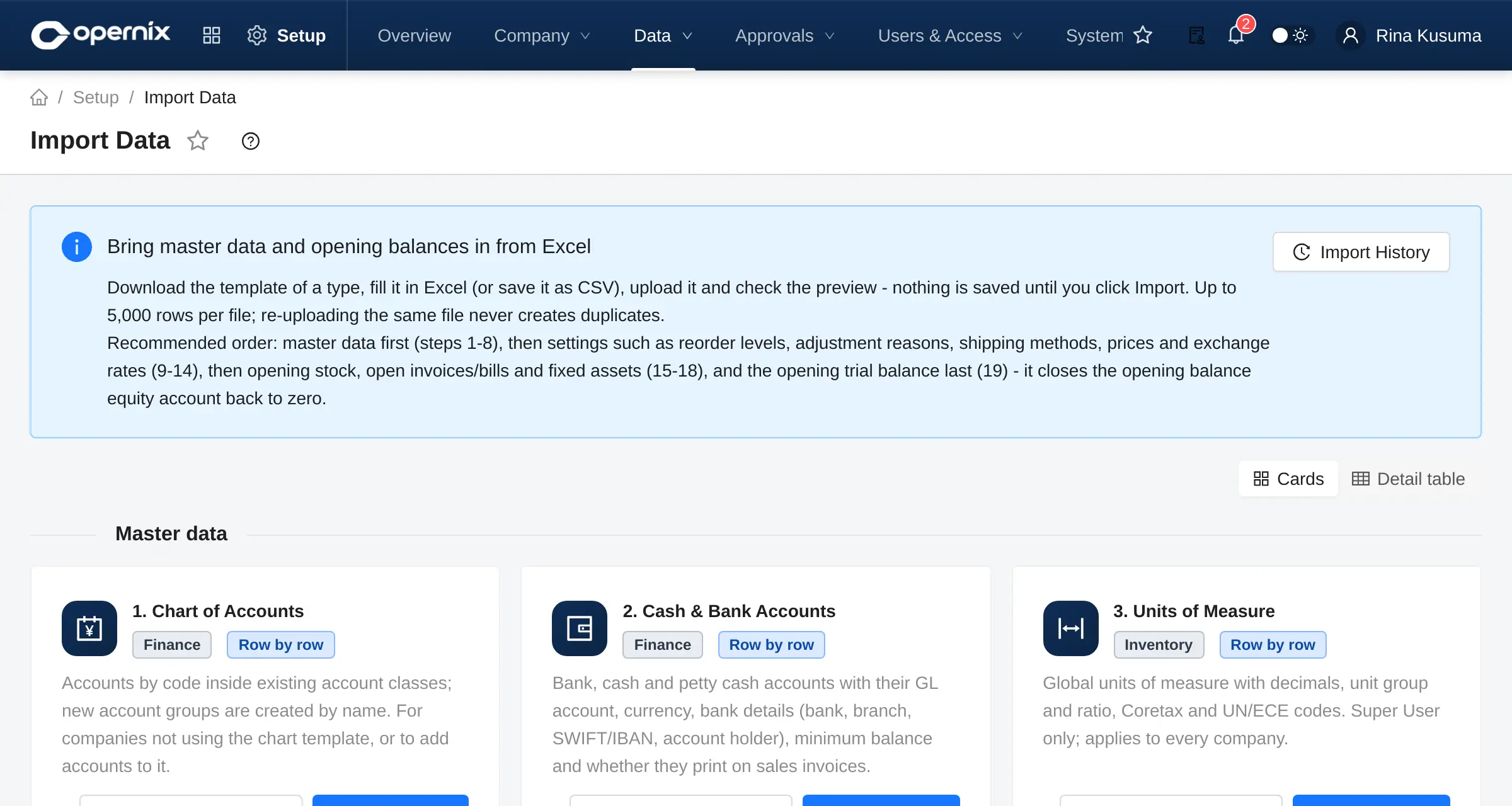
The Data Import menu provides a template for every data type. Files are validated row by row, and you decide what happens to records that already exist.
- Download the template, fill it in and upload it. Errors are flagged per row and can be downloaded as a report.
- Choose: create new only, create and update, or skip existing records.
- The import history keeps every file and its result.
- Opening balances for stock, receivables, payables, fixed assets and the trial balance.
Your financial data, handled the way it should be
Opernix is single-tenant SaaS: we run a separate environment for every customer, not one database for all.
A dedicated environment
Every customer runs on its own application stack and database. Updates and maintenance are carried out per environment.
Controlled access
Roles with a permission matrix per company, down to menus and buttons. Super User and company administrator are separate roles.
Audit trail
Posted documents are never deleted. A cancellation records the reason, the user and the time, and creates a reversing entry.
Sign-in protection
Login attempts are limited per user and per IP address, with a temporary lockout. Sessions are revoked on sign-out.
Scheduled backups
Scheduled database backups and a documented restore procedure. Frequency, location and retention are set out in the service agreement.
Encrypted credentials
Integration credentials such as PJAP and bank connections are stored encrypted and never displayed again once saved.
The hosting location, backup schedule and operational details for your environment are set out in the quote.
Frequently asked questions
Is Opernix cloud-based?
Yes. Opernix runs in the browser. We operate the servers, updates and scheduled backups; the details are set out in the service agreement.
Is our data separated from other customers?
Yes. Every customer gets its own application stack and database (single-tenant). Your data is never stored in the same database as another customer’s.
Where are the Opernix servers?
The hosting location and backup schedule for your environment are stated in the quote. Let us know if your company has specific data-location requirements.
Can we export our data?
Yes. Reports and lists can be exported to Excel and PDF.
How long does implementation take?
It depends on the number of companies, the modules and how ready your data is. The schedule and milestones are written into the quote before the project starts.
Is Opernix certified by the DJP, or a PJAP?
No. Opernix prepares tax data and exports it in the Coretax import format. Direct submission to Coretax uses the Coretax PJAP add-on, connected to the PJAP (authorised tax application provider) you contract. Validate the results with your tax consultant.
Can it be used on a phone?
Opernix runs in the browser. Employees have a self-service menu (schedule, leave, payslips, clock-in). A dedicated mobile app is not yet available.
Is it available in English?
Yes. The interface is available in Indonesian and English; the language is chosen on the sign-in page.
Where can we learn to use Opernix?
A full user guide is available inside the app for customers, from the implementation steps to day-to-day business processes, with screenshots. Our team also supports you throughout the implementation.
See Opernix working with data like yours
We walk you through the flows that matter to your business, from order to financial statements, and then prepare a written quote.